
One grocery listfor the whole house.
Most families have three grocery lists: a note on the fridge, a text thread and the one in someone’s head. Here is how to get it down to one.
Get early accessWhy one list
Two lists mean two half trips. Someone buys milk you already had, and nobody buys the eggs.
One shared list fixes most of that, as long as everyone can add to it and see what has already been bought.
How to keep a family list that works
Everyone can add to it
If only one person can add to the list, it stops being the family’s list. Whoever finishes the peanut butter should be able to put it on.
Sort it by store
Group things by where you buy them, so the person at the big store is not hunting for something only the corner market has.
Check it off as you shop
Checking things off in the store keeps the list right for anyone else looking at it, and stops a second person buying the same thing.
Know who got it
When the list shows who checked something off, nobody has to text “did you get the bread?”
Add from the recipe
When you choose a dinner, add what it needs right then. Copying ingredients over later is how things get missed.
Put it away in one step
In Sixish, checking something off puts it in your pantry, so the next dinner idea already knows you have it.
How the Sixish list works
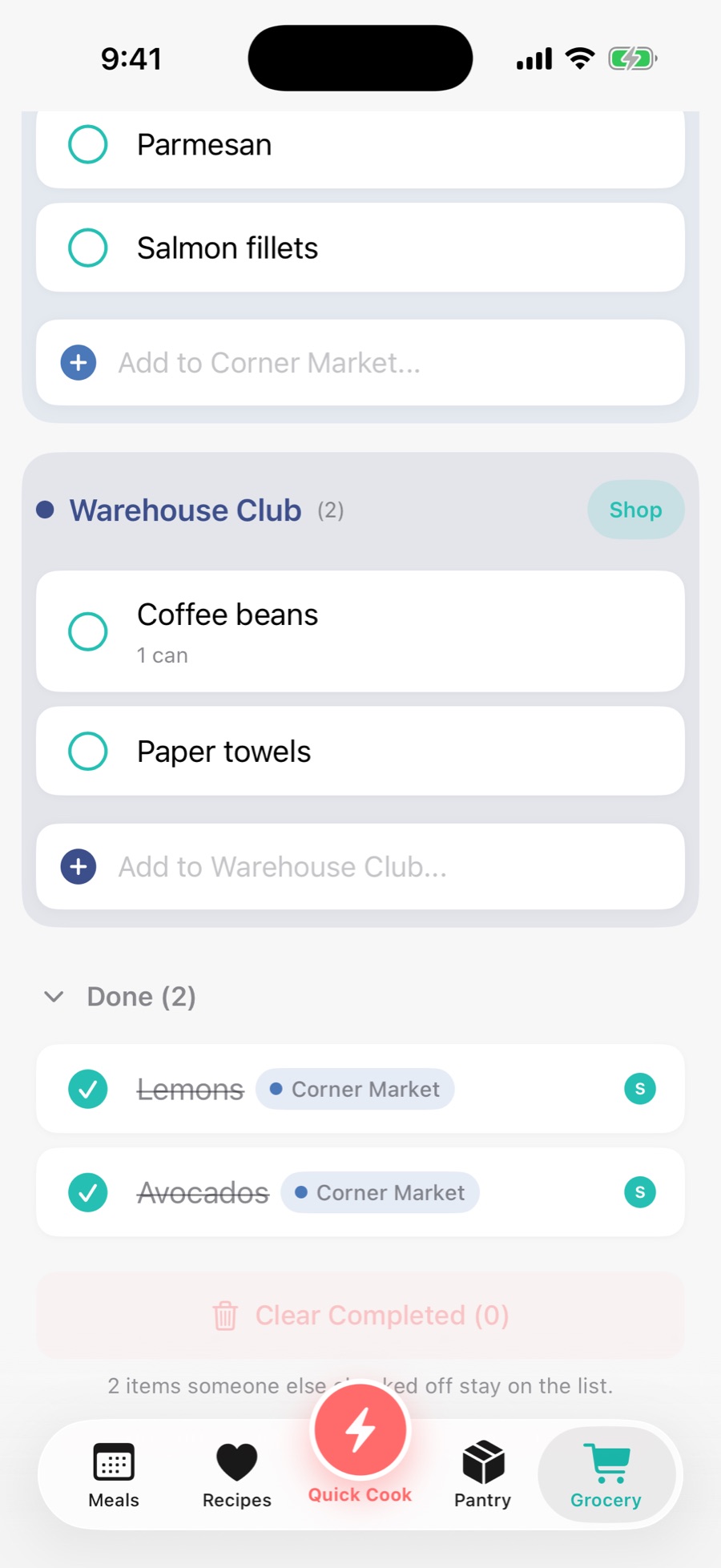
Shared with your household
Everyone you invite to your household sees the same list and can add to it.
Sorted by store
Add an item to the store you buy it at, and shop one store at a time.
Shows who checked it
Each checked item shows who got it.
Back in the pantry
Checked off means bought, and it goes straight into your pantry.
From a recipe in one tap
The ingredients a dinner needs and you do not have go on the list in one tap.
Questions, answered.
Can my partner and I use the same grocery list?
Yes. Invite them to your household and you both see the same list, add to it and check things off. Each checked item shows who got it.
Does checking something off update my pantry?
Yes. Checking an item off puts it in your pantry, so Sixish knows you have it the next time it suggests dinner.
Can I add things that are not for a recipe?
Yes. Add anything to the list yourself, like paper towels or the kids’ snacks, under the store you buy it at.
What does Sixish cost?
It is free for everything except creating new recipes: your pantry, imports, Cook Mode and the grocery list. You get 30 recipes to start, then 10 recipes a month. Sixish Plus is $4.99 a month or $34.99 a year for unlimited recipes, and one subscription covers everyone in your household.
Can my partner and kids use it too?
Yes. The grocery list is shared with everyone in your household, and each item you check off shows who got it.
Do I need an iPhone?
Yes. Sixish is an iPhone app.
How do I get it?
Sixish is in beta on iPhone. Get early access and we will send you a TestFlight invite when a spot opens.
See you at
sixish.
Sixish is coming to iPhone, with one list for the whole family. Get early access and we will send you a TestFlight invite when a spot opens.
Get early access